

Finding the right cycling GPS can feel like sorting a toolbox with too many nearly identical drawers. Some you want for simple distance and route tracking, others make sense for long training blocks, mixed-surface rides, e-bike trips, or daily commuting where screen clarity matters more than bells and whistles.
This roundup focuses on models that fit different riding habits, from compact units with straightforward displays to richer navigators with maps, coaching, and ride data. You get a clearer path to the style that fits your handlebars, your routes, and the amount of detail you actually want in front of you.
The Shortlist At A Glance
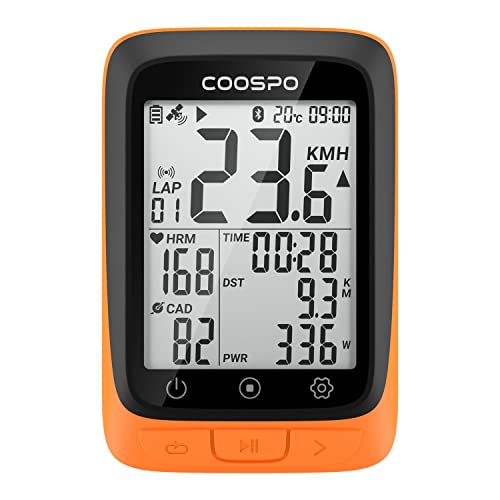
CooSpo Bike Computer Wireless GPS 2.4 inch LCD Display

iGPSPORT BSC100S GPS Bike Computer Wireless 2.6 inch LCD Display

Garmin Edge 540 Compact GPS Cycling Computer

Beeline Velo 2 Bike GPS Computer

Garmin Edge Explore 2 GPS Cycling Navigator

Garmin Edge 1050 Premium Cycling Computer
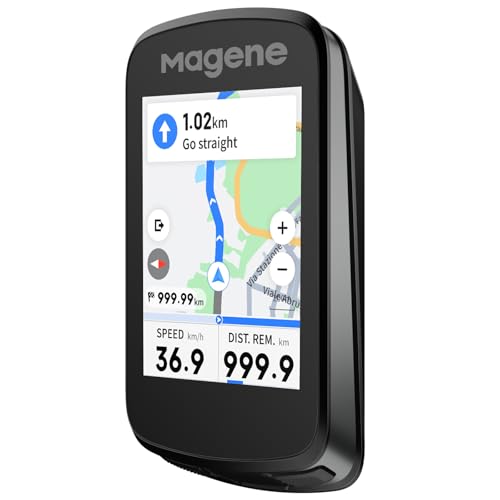
Magene C606 V2 Bike Computer GPS 2.8 inch Color Touchscreen
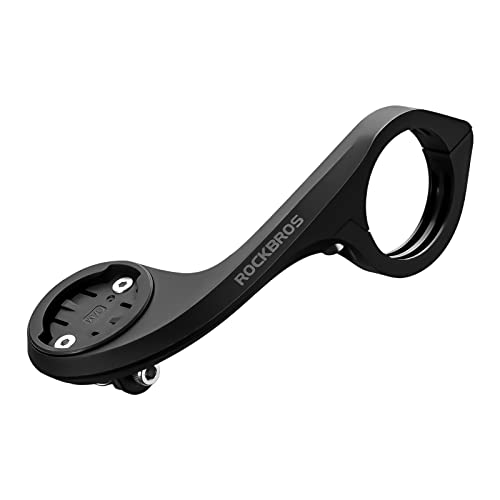
ROCKBROS Out Front Bike Mount Compatible with Garmin iGPSPORT

GEOID CC700 Pro 2.8 inch Color Touchscreen GPS Bike Computer

Magene C506 GPS Bike Computer 2.4 inch Color Touchscreen
More Details On Our Top Picks
For everyday commuting, this CooSpo unit keeps things straightforward with a 2.4-inch LCD, wireless GPS tracking, and Bluetooth plus ANT+ support. That mix suits you well if you want ride data without a crowded cockpit, especially on city loops or steady weekend mileage.
The auto backlight is useful on early starts and late returns, and the waterproof build makes sense for changeable weather. The trade-off is simple, the display is smaller than the 2.6-inch and 2.8-inch units later in this list, so riders who like dense maps may prefer a larger screen.
Strong Points
- Wireless GPS tracking keeps the setup cleaner than a bundle of extra cables.
- Bluetooth and ANT+ expand sensor pairing for cadence, heart rate, or other compatible gear.
- The auto backlight helps in dim streets and early-morning starts.
- Waterproof construction is a sensible fit for mixed-weather commutes.
Small Caveats
- The 2.4-inch screen feels modest beside the bigger displays from iGPSPORT and Magene.
- Riders who want a map-heavy interface may outgrow it quickly.
- Like many compact units, button navigation can feel plain next to touch-first models.
Feature Card
Who It Suits Best
You suit this pick best if you want a compact, no-drama cycling computer for commuting, fitness loops, or weekend rides where basic tracking matters more than advanced mapping.
A Better Fit Elsewhere
Garmin Edge Explore 2 suits you better if you want a more route-focused navigator with eBike compatibility and a stronger maps-first feel.
The BSC100S feels like the step up for riders who want a little more screen space without jumping into a big, feature-heavy unit. Its 2.6-inch LCD gives you more room than the CooSpo above, and the rechargeable design fits long training weeks or a busy commuting schedule.
Forty hours of battery life is the kind of figure that helps on multi-day use, though real-world routines still depend on backlight use and connected sensors. You may find it especially comfortable if you value simple visibility and steady charging intervals over deep navigation tools.
Highlights
- The 2.6-inch display gives you a bit more breathing room than the smallest units here.
- Wireless Bluetooth and ANT+ support make pairing practical for common ride accessories.
- The rechargeable design suits riders who do not want to handle disposable batteries.
- Long battery claims make it easier to plan for touring days or a week of commuting.
Worth Noting
- It stays more basic than the Garmin Edge 540 or Edge 1050 for training depth.
- The feature set makes sense for core ride tracking, not layered route planning.
- You may still want a mount that keeps the display easy to glance at, especially on rough roads.
Details At A Glance
Who It Suits Best
You suit this pick best if you want a straightforward GPS computer with a little more screen comfort for regular rides, fitness tracking, or longer weekend loops.
A Better Fit Elsewhere
Magene C506 suits you better if you want a touch-first interface and a stronger focus on smart navigation and indoor training.
The Edge 540 leans hard into structured riding, and that matters most if your week is built around intervals, climbing, or longer training blocks. Button controls suit rough weather and gloved hands better than touch-only layouts, which makes the unit feel dependable on cold mornings.
The 2.6-color display keeps route data readable without turning the cockpit into a dashboard, and the adaptive coaching angle gives you more than basic speed and distance. Compared with the simpler iGPSPORT and CooSpo models, this one is for riders who want the computer to act more like a training partner than a logbook.
Upsides
- Button controls stay easy to work with in wet weather or with full-finger gloves.
- Adaptive coaching tools help you organize harder sessions with less guesswork.
- Advanced navigation suits riders who mix training routes with unfamiliar roads.
- The compact body keeps handlebar space under control.
- ANT+ and Bluetooth support make it friendly to a wide accessory setup.
Areas To Watch
- The learning curve is steeper than the more basic CooSpo and iGPSPORT units.
- Touchscreen fans may prefer the Edge 1050 or Magene C606 V2 instead.
- The training depth adds complexity you may not need for relaxed city riding.
Core Details
Who It Suits Best
You suit this pick best if you train with purpose and want a compact head unit that handles coaching, navigation, and accessory pairing with a serious feel.
A Better Fit Elsewhere
Garmin Edge 1050 suits you better if you want a larger touchscreen, a built-in speaker, and the most feature-dense setup in this group.
The Velo 2 takes a very different path from the Garmin and Magene units above, because it keeps the interface minimal and the cockpit uncluttered. That approach makes a lot of sense for city riders, casual tourers, and anyone who wants guidance without a full map-heavy dashboard.
The strap mount included in the package is a helpful touch, and glove-friendly handling matters more than you might think on cold commutes. Eleven-plus hours of battery life works for many day rides, though dedicated long-distance cyclists may still want a device built around deeper route detail.
Bright Spots
- The compact approach keeps your bars cleaner than bulkier GPS computers.
- The included strap mount makes setup easier right out of the box.
- Glove-friendly use is practical for chilly starts and shoulder-season rides.
- Weatherproofing adds peace of mind for uncertain forecasts.
Points To Note
- Its minimalist style gives you less on-screen data than the Garmin Edge 540 or Edge 1050.
- Riders who rely on dense mapping will likely want a fuller navigator.
- The cleaner interface trades away some of the training depth found in feature-heavy units.
Feature Rundown
Who It Suits Best
You suit this pick best if you like a neat handlebar setup and want route help without a heavy, map-dense device.
A Better Fit Elsewhere
GEOID CC700 Pro suits you better if you want rerouting, WiFi sync, and a more conventional touchscreen computer.
The Edge Explore 2 is built for navigation-first riding, not for riders who want to stare at training charts all day. That makes it a strong match for touring, mixed-route exploration, and e-bike trips where maps and guidance matter more than workout metrics.
Its easier learning curve should appeal to riders who want a navigator that feels approachable from the first few rides. The safety feature set adds practical reassurance, though the richer workout crowd may still want the Edge 540 or 1050 for a deeper training layer.
Reasons To Buy
- The navigation-first setup keeps route planning front and center.
- eBike compatibility widens its usefulness for assisted riding.
- Map and navigation tools help on unfamiliar roads and longer trips.
- The approachable interface suits riders who prefer less menu hunting.
Things To Consider
- It gives you less training detail than the Edge 540 or Edge 1050.
- Riders who want a very compact, minimal unit may still prefer the Beeline Velo 2.
- Its route-first focus means some athletes may find it more navigator than coach.
At A Glance
Who It Suits Best
You suit this pick best if your rides lean toward touring, discovery, or e-bike travel and you want guidance that feels simple to live with.
A Better Fit Elsewhere
Magene C606 V2 suits you better if you want more climbing tools, live segments, and a stronger data view for training rides.
The Edge 1050 sits at the high-function end of this roundup, and that shows up in the vivid 3.5-inch touchscreen, built-in speaker, and broader training feature set. For riders who spend serious time on the bike, the larger interface can feel like a dashboard rather than a simple accessory.
Group ride features and road hazard alerts make sense for busy roads and social rides where awareness matters. The trade-off is pretty direct, the richer experience usually comes with more complexity and a bigger footprint than the cleaner, lighter picks earlier in the list.
Standout Traits
- The 3.5-inch vivid touchscreen gives you more room for maps and workout data.
- The built-in speaker adds audible prompts that help on noisy roads.
- Road hazard alerts are useful for riders who travel through busy traffic patterns.
- Group ride features fit cyclists who ride with clubs or training partners.
- Bluetooth, ANT+, and Wi-Fi support keep data syncing flexible.
Room For Improvement
- The larger format may feel like more device than casual commuters need.
- Touchscreen-heavy controls can be less convenient in heavy rain than button-first units.
- Its full feature set makes the setup feel busier than the Beeline Velo 2 or CooSpo.
Spec Overview
Who It Suits Best
You suit this pick best if you want a large-screen cycling computer with serious road awareness, broader training tools, and a premium feel.
A Better Fit Elsewhere
Garmin Edge 540 suits you better if you want a smaller, more compact unit that stays easier to manage on simpler training rides.
The C606 V2 speaks to riders who like seeing more than distance and average speed on one screen. ClimbPro, live segments, cycling dynamics, and offline navigation make it feel well suited to hill-heavy routes, structured workouts, and unfamiliar roads.
Its 2.8-inch color touchscreen gives it a more modern feel than the button-first Garmin Edge 540, while the 15 to 25 hour battery range keeps it flexible for training blocks. The honest catch is that more tools also mean more setup, so relaxed riders may not need this much detail.
Best Bits
- Climbing tools help make hilly routes easier to manage.
- Live segments add a competitive edge for structured rides.
- Cycling dynamics appeal to riders who want deeper ride data.
- Offline navigation is handy in areas with patchy signal.
- The touchscreen layout feels more modern than button-only units.
Minor Gripes
- The denser feature set takes more time to learn than simpler units.
- Touchscreen handling can feel less direct than button controls in rain or with gloves.
- Riders who want a very clean interface may prefer the Beeline Velo 2.
Technical Sheet
Who It Suits Best
You suit this pick best if you enjoy data-heavy training, climbing, and route planning and want a touchscreen that feels packed with useful tools.
A Better Fit Elsewhere
Garmin Edge Explore 2 suits you better if you want a simpler navigator for touring and e-bike use rather than a training-focused screen.
This is the helper piece in the lineup, and it matters more than many cyclists expect. An out-front mount moves the head unit forward, which can keep your line of sight more natural than a crowded stem area, especially on compact bikes or busy bar setups.
The nylon build keeps it light at 1.6 ounces, and compatibility with Garmin and iGPSPORT units in the stated size range makes it useful for several computers in this roundup. The trade-off is obvious, it does not add navigation features on its own, so it only makes sense alongside a compatible head unit.
Positives
- The forward position helps you glance down without taking your eyes far off the road.
- The nylon construction keeps weight low on the bars.
- It works with a stated range of Garmin and iGPSPORT sizes.
- The cleaner position can help crowded handlebar setups feel less cluttered.
Things To Consider
- You need a compatible computer, so this is an accessory rather than a standalone navigator.
- The fit range means you should check sizing before mounting it.
- Riders who want a full navigation device should look to one of the GPS units above.
Key Specs
Who It Suits Best
You suit this pick best if you already own a compatible cycling computer and want a tidier, forward position on the bars.
A Better Fit Elsewhere
Garmin Edge 1050 suits you better if you need the computer itself, not just the mount, and want a larger navigation platform.
The CC700 Pro is a strong middle ground for riders who want navigation help without moving all the way into the most expensive tier. Re-route planning, WiFi auto-sync, and ANT plus Bluetooth support make it practical for rides that split time between known roads and surprise detours.
The message notification support adds a little daily convenience, while the IPX7 rating makes it a sensible choice for wet roads or damp bike storage. Compared with the Beeline Velo 2, this feels more conventional and information-rich, though that also means a busier interface.
Standout Traits
- Re-route planning is useful when your path changes mid-ride.
- WiFi auto-sync saves time during routine updates.
- ANT+ and Bluetooth support keep accessory compatibility broad.
- Message notifications give you a small convenience boost on everyday rides.
- IPX7 water resistance is reassuring in wet conditions.
Minor Gripes
- The interface can feel busier than the Beeline Velo 2’s cleaner layout.
- Riders who want deeper training coaching may still prefer Garmin’s higher-end units.
- The additional features take more setup time than a basic tracker.
Feature Rundown
Who It Suits Best
You suit this pick best if you ride mixed routes, want rerouting help, and prefer a touchscreen computer with modern connectivity.
A Better Fit Elsewhere
Garmin Edge 540 suits you better if your main goal is serious training support with a more mature coaching system.
The C506 keeps the screen compact while still giving you smart navigation, fast WiFi, Bluetooth, and riding-assistant features. That balance makes it useful for riders who want more than the simplest tracker but do not want a bulky computer dominating the bars.
It also fits indoor training, which broadens its use beyond the road and helps during bad-weather months. Compared with the Magene C606 V2, you give up some of the deeper climbing and segment tools, but you gain a simpler footprint that feels easier to live with day to day.
Positives
- The 2.4-inch touchscreen keeps the unit compact.
- Smart navigation helps on familiar and unfamiliar routes.
- WiFi and Bluetooth make routine syncing more convenient.
- Indoor cycling support broadens its usefulness through the year.
- The smaller footprint works well on tighter handlebar setups.
Worth Noting
- The smaller screen gives you less on-screen room than the 2.8-inch Magene C606 V2.
- Riders who want climbing tools and live segments should look higher up the list.
- The compact format may feel too simple for data-heavy training sessions.
Core Details
Who It Suits Best
You suit this pick best if you want a compact GPS computer for everyday riding, occasional trainer sessions, and straightforward smart navigation.
A Better Fit Elsewhere
iGPSPORT BSC100S suits you better if you want a simpler, long-battery alternative with a slightly larger display and a more basic feel.
How To Choose The Right Bicycle Gps Navigations
Screen Size, Controls, And Reading On The Move
Start with the display, because that shapes everything else you do on the bike. A 2.4-inch screen like the CooSpo and Magene C506 keeps the setup compact, while 2.8-inch and 3.5-inch screens offer more room for maps, prompts, and ride metrics.
Controls matter just as much. Button-based units such as the Garmin Edge 540 tend to feel steadier in rain or with gloves, while touchscreens are often easier for quick menu changes during calm, dry rides.
Navigation Depth Versus Simple Tracking
Some cycling computers are really route tools, and others are closer to ride journals with GPS. The Garmin Edge Explore 2 and GEOID CC700 Pro lean harder toward map guidance and rerouting, while the CooSpo and iGPSPORT BSC100S stay more focused on core ride tracking.
That difference matters on your usual roads. City commuters usually need glanceable data and a tidy mount, while touring riders and unfamiliar-route riders benefit more from reroute planning, map support, and a screen that can show more context at once.
Battery Life And Connection Options
Battery life shapes how often you think about charging. The iGPSPORT BSC100S and Garmin Edge 540 serve longer outings differently, while the Garmin Edge 1050 and Magene C606 V2 bring more features that can change how the battery is used in real life.
Connection support also deserves attention. Bluetooth and ANT+ cover most common accessories, and WiFi on models like the GEOID CC700 Pro and Magene C506 makes syncing less tedious for regular riders.
Match The Unit To Your Riding Style
Training riders usually get the most from coaching tools, climb data, and segment support. Casual riders often care more about quick readability, compact size, and a mount that does not crowd the bars.
The most sensible choice is the one that fits your rides without asking for constant compromise. A feature-rich head unit can feel like too much on a short commute, while a minimal unit can feel thin on long routes or structured workouts.
Things Worth Knowing Before You Choose
Wrong Turns To Avoid
Many shoppers focus on screen size alone and miss the control style, which changes how easy the unit is to live with in bad weather. Another common miss is buying a navigation-heavy model for short city rides, where a simpler tracker would feel less busy.
Mount fit matters too. The ROCKBROS mount works only within its stated size range, so checking compatibility before you order can save you the hassle of a mismatched cockpit.
The Upgrade Payoff
Higher-tier units usually cost more because they pack in better screens, stronger coaching tools, speaker support, reroute logic, and broader wireless options. That extra spend starts making sense on long rides, unfamiliar roads, or structured training blocks where quick access matters.
The Garmin Edge 1050 is a good example of where the money goes, since the larger touchscreen, speaker, and road-hazard alerts push it beyond basic tracking. For a more modest step up, the GEOID CC700 Pro and Magene C606 V2 give you smart navigation features without jumping all the way to the most elaborate setup.
Frequently Asked Questions
What Does ANT+ Do On A Cycling Computer?
ANT+ is a wireless standard used by many cycling sensors and accessories. It helps your computer communicate with gear such as cadence or heart-rate devices when they are compatible.
Do You Need A Touchscreen On A Bike Computer?
Not always, because button controls can work better in rain or while wearing gloves. Touchscreens feel easier for menu navigation and map use on calmer rides.
Which Model Fits Touring Better?
The Garmin Edge Explore 2 and GEOID CC700 Pro make strong touring choices because they focus on maps and rerouting. The Beeline Velo 2 also suits riders who prefer a cleaner, less crowded display.
Can You Use These On Indoor Trainers?
Some can, including the Magene C506, which includes indoor cycling support. That makes it easier to keep one computer in rotation for both outside rides and trainer sessions.
Is A Bigger Screen Always Better?
Not always, because bigger screens can add bulk you do not want on a small cockpit. A compact display often works better for commuters and riders who value a lighter setup.
Closing Thoughts
The best cycling GPS is the one that matches how you actually ride, not the one with the longest feature list. A commuter may prefer the small, clear CooSpo or Magene C506, while a training rider may get more from the Garmin Edge 540 or Edge 1050. Touring and route-first riders have strong options in the Explore 2 and GEOID CC700 Pro, and the Beeline Velo 2 keeps the cockpit neat. Choose the style that feels easy to live with, because that usually matters more than any spec sheet flourish.
