
Bicycle Radar Sensors can make busy-road riding feel less uncertain by bringing approaching-vehicle alerts or connected ride data closer to your handlebars. Your ideal setup depends on the roads you ride, whether you already use a cycling computer, and whether you need vehicle awareness, cadence data, navigation, or all three. This list separates the dedicated rear radar from the sensors and computers that can build out your broader riding setup. For daily commutes, long rural routes, and indoor trainer sessions, that distinction matters.
The Shortlist for Connected Rides

CYCPLUS Cycling Speed & Cadence Sensor, Bluetooth & ANT+

MOOFIT Speed/Cadence Sensor, ANT+ Bluetooth

Garmin Edge 540 Compact GPS Cycling Computer

CYCPLUS GPS Wireless Bike Computer 2.9-inch LCD

GEOID CS600 Cadence/Speed Sensor for Cycling

Garmin Varia RVR315 Cycling Rearview Radar

Garmin Edge Explore 2 GPS Cycling Navigator

CYCPLUS GPS Wireless Bike Computer M2, 2.5-inch LCD
Garmin Edge 840 Compact GPS Cycling Computer
More Details On Our Top Picks
For riders building a connected setup without crowding the bike, this CYCPLUS unit handles speed or cadence tracking in a very small 9.2 g package. Cadence means pedal revolutions per minute, while a speed sensor measures wheel rotation to calculate riding speed. Bluetooth and ANT+ are wireless connection standards, letting you pair the sensor with compatible computers or apps.
The mode switch gives you a practical choice between speed and cadence use, while tool-free fitting keeps setup approachable for newer cyclists. Its IP67 rating indicates protection against dust and temporary water immersion, which suits wet commutes and muddy storage better than an unsealed accessory. The honest read is that this tracks ride metrics, not vehicles behind you, so it complements rather than replaces the Garmin Varia RVR315.
Strong Points
- At 9.2 g, it adds very little weight to a training or commuter bike.
- Bluetooth and ANT+ support gives you more pairing flexibility across compatible equipment.
- Tool-free mounting makes moving it between bikes less involved.
- The stated 300-hour battery duration suits riders who dislike frequent battery changes.
Things To Consider
- You select either speed or cadence mode, rather than collecting both measurements from one sensor.
- Owners commonly need to keep the sensor and mounting surface clean after wet, gritty rides for secure attachment.
Key Specs
Who It Suits Best
You benefit most from this sensor when your main goal is adding cadence or speed data to a compatible cycling computer or training app.
Where Another Pick Suits Better
Garmin Varia RVR315 Cycling Rearview Radar suits you better for road rides where approaching-vehicle alerts matter more than pedal and wheel data.
Indoor riding changes the priorities a little, and the MOOFIT sensor is aimed at both bicycles and spin bikes. Its Bluetooth and ANT+ connection options make it relevant for compatible Wahoo, Zwift, Openrider, and Peloton setups. That broad platform focus is its main attraction for riders splitting their week between a trainer and the road.
Like the CYCPLUS Cycling Speed & Cadence Sensor, this is a ride-data accessory rather than a rear traffic-monitoring device. The IP67 build gives useful weather resilience for an outdoor bike, though indoor use still calls for wiping sweat from the sensor area after hard sessions. You may find its flexibility especially useful where several apps or devices share the same bike.
What We Like
- Works with bicycles and spin bikes, so your data setup can travel between riding styles.
- Bluetooth and ANT+ give compatible apps and head units two connection paths.
- Support for major training platforms helps keep indoor session records consistent.
Worth Noting
- It provides cadence or speed information, not the vehicle warnings delivered by Garmin Varia RVR315 Cycling Rearview Radar.
- Regular wipe-downs matter on spin bikes, where sweat can collect around mounted accessories.
- Pairing behavior depends on the particular app or head unit you use.
At A Glance
Made For
You get the most from this sensor when indoor platform compatibility matters as much as outdoor speed or cadence tracking.
Consider Something Else When
CYCPLUS GPS Wireless Bike Computer M2, 2.5-inch LCD fits you better when you need a handlebar display for ride information instead of a sensor alone.
Garmin Edge 540 Compact GPS Cycling Computer brings navigation, targeted adaptive coaching, and sensor connectivity into one compact handlebar unit. Its 2.6-inch color display gives you a dedicated screen for ride information rather than asking you to rely on a phone. Physical button controls are particularly sensible for gloved rides or rainy conditions, where touch input can become fiddly.
Compared with the MOOFIT Speed/Cadence Sensor, this computer is the command center rather than the data source. The listed battery duration of up to 26 hours can cover substantial ride time, although route complexity, screen use, and connected accessories can shape your own charging rhythm. Nothing flashy about the button-first approach, but it suits training-focused riders well.
Highlights
- Button control gives you a dependable physical interface during wet or gloved rides.
- GPS navigation helps you follow unfamiliar routes without holding a phone.
- Adaptive coaching supports riders following structured training plans.
- ANT+ and Bluetooth connections support compatible sensors and accessories.
- Up to 26 hours of stated battery duration suits long weekend routes.
Trade Offs
- The button-only interface may take longer to learn than the touchscreen approach on Garmin Edge 840 Compact GPS Cycling Computer.
Technical Sheet
Right Fit For
You will appreciate this computer most when structured training, mapped routes, and dependable button operation sit at the center of your riding.
Not Your Match When
Garmin Edge Explore 2 GPS Cycling Navigator suits you more naturally when route guidance and eBike compatibility matter more than coaching tools.
A larger 2.9-inch LCD screen is the key draw on this CYCPLUS GPS Wireless Bike Computer. LCD means liquid-crystal display, a screen format used here to show ride information in a straightforward layout. The automatic backlight can help keep the display visible as a daytime ride runs into lower light.
It differs from Garmin Edge 540 Compact GPS Cycling Computer by centering its appeal on an expansive display and core GPS data rather than listed adaptive coaching. Bluetooth and ANT+ support leave room for a connected setup, including compatible accessories. For commuters checking speed at traffic lights, that broad screen may feel more comfortable than a smaller unit.
Upsides
- The 2.9-inch screen gives ride data more physical space at a glance.
- Automatic backlighting supports changing daylight conditions.
- GPS tracking adds location-based ride information without relying on wheel rotation alone.
- IPX6 water resistance is suited to rain and strong splashes during ordinary rides.
Minor Gripes
- Its source details do not list route-navigation or coaching functions.
- Owners commonly need to dry the screen and mount after rain to avoid grime building around the contact points.
Feature Snapshot
Best Suited To
You suit this CYCPLUS computer when a larger ride-data display and uncomplicated wireless connectivity are your main priorities.
Look Elsewhere When
Garmin Edge 840 Compact GPS Cycling Computer is the stronger match for you when touchscreen operation and targeted adaptive coaching are important.
GEOID CS600 Cadence/Speed Sensor for Cycling leans heavily into software and device compatibility. It can connect through ANT+ or Bluetooth with compatible cycling computers, sport watches, and mobile apps. Its listed platform support includes Onelap, Zwift, Rouvy, Peloton, Openrider, Cyclemeter, RidewithGPS, TrainerRoad, and Wahoo Fitness.
That makes this a more app-focused option than the CYCPLUS Cycling Speed & Cadence Sensor, particularly for riders logging sessions across several services. The source notes that the Wahoo app cannot track two data streams at once, even with two sensors, so your preferred software deserves a quick compatibility check. For a mixed indoor-outdoor routine, this is a sensible data companion rather than a radar device.
Standout Traits
- ANT+ and Bluetooth support gives you connection choices with compatible equipment.
- Works with cycling computers, sport watches, and iOS or Android apps.
- Listed support for several training and route platforms can reduce app switching.
- Multiple data copies can support post-ride analysis across connected services.
- Its sensor-focused design fits riders who already own a display device.
- Useful for building cadence and speed records across indoor and outdoor rides.
Room For Improvement
- The Wahoo app limitation prevents simultaneous tracking of two data streams through that app.
- You may need to recheck pairing after switching between a watch, computer, and phone app.
- As with any bike-mounted sensor, keeping the mount area free of grit helps avoid attachment issues.
Quick Facts
Who Will Love This
You will get strong value from this GEOID sensor when your rides move between compatible apps, a sport watch, and a cycling computer.
A Better Fit Elsewhere
MOOFIT Speed/Cadence Sensor, ANT+ Bluetooth suits you more neatly when a dedicated spin-bike setup is central to your routine.
Garmin Varia RVR315 Cycling Rearview Radar is the dedicated rear-radar option in this list. It provides visual and audible alerts for vehicles at distances up to 153 yards away. A rearview radar is a cycling accessory designed to provide awareness alerts about traffic approaching from behind, rather than a replacement for your own road observation.
For regular riding on open roads or long suburban stretches, that extra stream of information can be useful without asking you to turn your head as often. Unlike the data-only GEOID CS600 Cadence/Speed Sensor for Cycling, the RVR315 focuses on vehicle awareness rather than performance metrics. One thing worth considering is that you need a suitable compatible display or alert method for the notifications to be useful in your setup.
Bright Spots
- Alerts cover vehicles up to 153 yards away, giving you earlier awareness on straight road sections.
- Visual and audible alert formats provide more than one way to notice approaching traffic.
- Its focused rear-radar role avoids duplicating speed and cadence sensor duties.
- A clear match for riders who spend substantial time sharing roads with motor traffic.
Points To Note
- You still need to stay attentive and make your own riding decisions around traffic.
- Your mounting position needs regular checks, especially after rough roads, bag contact, or wet-weather riding.
Feature Rundown
Who Should Grab It
You are the right match for this radar when your normal rides include regular vehicle traffic on roads with long rearward sightlines.
Skip It When
Garmin Edge 540 Compact GPS Cycling Computer fits you better when your priority is navigation and training data rather than rear vehicle alerts.
Garmin Edge Explore 2 GPS Cycling Navigator puts the emphasis on maps, navigation, and straightforward use. eBike compatibility makes it particularly relevant for riders using assisted bikes for commuting, touring, or longer leisure routes. That focus separates it from the training-forward Garmin Edge 540 Compact GPS Cycling Computer.
A navigator can reduce phone handling during unfamiliar rides by keeping route information on the bike. Its listed safety features add to the broader connected-riding role, though the supplied details do not specify each function. For riders whose routes change often, this may be the more comfortable direction than a sensor-only setup.
Reasons To Buy
- GPS maps and navigation support route-focused riding.
- eBike compatibility suits assisted commuting and recreational mileage.
- Easy-to-use positioning makes it approachable for riders who prefer direct controls.
Softer Spots
- The supplied details list safety features without naming their individual functions.
- Route devices need periodic charging and map preparation before a long unfamiliar outing.
- It does not replace the dedicated rear-alert role of Garmin Varia RVR315 Cycling Rearview Radar.
Spec Overview
Built With In Mind
You benefit most from Edge Explore 2 when discovering routes and using eBike-compatible navigation matters more than performance coaching.
Another Choice May Suit
CYCPLUS GPS Wireless Bike Computer 2.9-inch LCD is a better fit for you when a large screen for core ride metrics matters more than listed map guidance.
CYCPLUS GPS Wireless Bike Computer M2, 2.5-inch LCD combines a compact display with four-satellite positioning and a 1000 mAh battery. Four-satellite positioning refers to location tracking that uses four satellite systems, helping the computer establish ride location data. The stated working duration exceeds 70 hours, which stands apart from the Garmin Edge 540 Compact GPS Cycling Computer’s listed 26-hour figure.
Its automatic backlight and Bluetooth or ANT+ support make it an appealing all-round ride-data screen for regular mileage. CYCPLUS FIT and Strava syncing suits riders who want ride records moved into those services after a session. For multi-day touring, the long stated runtime may be the detail that changes your shortlist.
Plus Points
- More than 70 hours of stated operation reduces charging stops during extended trips.
- Four-satellite positioning supports location tracking across varied routes.
- Bluetooth and ANT+ let you connect compatible sensors and accessories.
- Syncing with CYCPLUS FIT and Strava supports easier post-ride record keeping.
- IPX6 protection suits riding through rain and road spray.
Small Caveats
- The 2.5-inch screen is smaller than the 2.9-inch display on CYCPLUS GPS Wireless Bike Computer 2.9-inch LCD.
- Long battery intervals can make it easy to postpone charging, so a charge check before a tour still helps.
Details At A Glance
The Right Fit
You are well suited to the M2 when long runtime, compact dimensions, and post-ride syncing are central to your cycling routine.
Reach For A Different Pick When
Garmin Edge Explore 2 GPS Cycling Navigator fits you better when maps and route navigation take priority over extended stated battery duration.
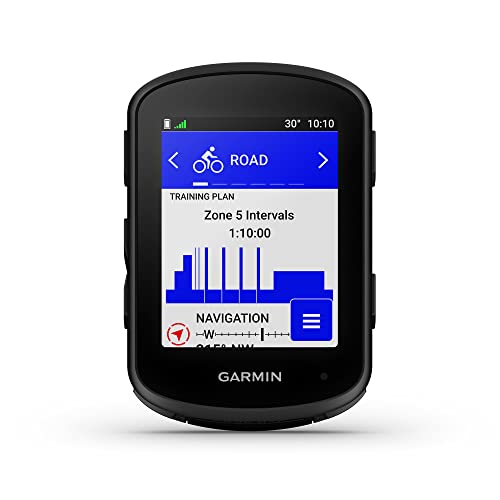
Garmin Edge 840 Compact GPS Cycling Computer gives you both touchscreen and button control in one navigation and training device. That dual-input approach makes sense for riders who like quick screen interaction on dry days but want buttons during rain, cold, or glove use. Targeted adaptive coaching and advanced navigation put it at the more involved end of this list.
Compared with Garmin Edge 540 Compact GPS Cycling Computer, the touchscreen is the defining practical difference. You may find the added control flexibility worthwhile on long routes with frequent map interaction, though it also means more screen surface to keep clean. It remains a cycling computer, not a replacement for Garmin Varia RVR315 Cycling Rearview Radar’s rear vehicle alerts.
Best Bits
- Touchscreen and buttons let you choose the control method that suits current conditions.
- Advanced navigation supports rides with frequent route changes.
- Targeted adaptive coaching suits cyclists following training goals.
- Compact sizing helps keep the handlebar area from feeling overloaded.
Areas To Watch
- The added touchscreen may be more than you need for straightforward metric viewing.
- Keeping the screen clean improves touch response after rain, dust, and road spray.
- Your setup may still need a separate rear radar for vehicle-awareness alerts.
Feature Card
Whose Shelf It Belongs On
You are the natural fit for Edge 840 when you want advanced navigation and coaching with both touch and physical controls.
Where A Sibling Pick Shines
Garmin Edge 540 Compact GPS Cycling Computer suits you better when tactile buttons are enough and you prefer a simpler control approach.
How To Choose The Right Bicycle Radar Sensors
Start With the Alert You Actually Need
A dedicated rear radar serves a different purpose from a cadence sensor, speed sensor, or cycling computer. The Garmin Varia RVR315 Cycling Rearview Radar is the relevant choice here for alerts about vehicles approaching behind you. Speed and cadence sensors track your own movement, while GPS computers display route and ride information.
Your roads should guide the decision. Frequent rides on traffic-heavy suburban roads make rearward awareness more relevant, while quiet trail riding may place more value on navigation or performance data. A radar unit can be a helpful additional information source, but you still need to stay alert to your surroundings.
Check Your Existing Display Setup
Before adding a radar or sensor, look at the device already on your handlebars or wrist. Bluetooth and ANT+ are common wireless standards used by compatible cycling computers, watches, and apps. Matching protocols avoids a setup where accessories cannot communicate with the screen or software you plan to use.
Riders without a head unit may prefer a cycling computer such as Garmin Edge 540 Compact GPS Cycling Computer or CYCPLUS GPS Wireless Bike Computer M2, 2.5-inch LCD. Riders who already have a compatible display can focus on a dedicated accessory. This keeps your setup more purposeful and avoids buying overlapping functions.
Match Battery Habits to Ride Length
Battery duration matters differently for a short commute than for a full-day ride. CYCPLUS GPS Wireless Bike Computer M2, 2.5-inch LCD lists more than 70 hours of operation, while Garmin Edge 540 Compact GPS Cycling Computer lists up to 26 hours. Longer stated duration means fewer charging sessions, though a pre-ride charge check remains a smart habit.
Small sensors can also need battery attention, even where the listed runtime is extensive. Your maintenance routine should include checking mounts, wiping dirt from contact points, and confirming connections before an important route. A clean, secure installation is often more useful than a long feature list.
Choose Controls for Your Conditions
Buttons, touchscreens, and large displays all solve slightly different problems. Buttons suit gloves and wet weather, while touchscreen control can be convenient for map interaction. A larger screen can be easier to read at a glance, but may occupy more handlebar space.
Long-distance riders often benefit from navigation and runtime first. Training-focused cyclists may care more about cadence, structured coaching, and app connections. Your strongest setup is the one that fits your actual weekly rides, not every possible ride you could take.
Things Worth Knowing Before You Choose
Common Shopping Slip Ups
A common mistake is treating every cycling sensor as a rear radar. Speed and cadence models provide useful training data, but they do not provide the vehicle alerts listed for Garmin Varia RVR315 Cycling Rearview Radar. Start by deciding whether your concern is traffic awareness, route guidance, or performance measurement.
Another issue is overlooking connection standards. Check whether your current computer, watch, or app supports Bluetooth, ANT+, or both before choosing an accessory. That short check can prevent frustrating pairing attempts later.
What The Higher Tier Buys
Higher-tier cycling computers often add advanced navigation, training guidance, or more flexible controls. Garmin Edge 840 Compact GPS Cycling Computer, for example, combines touchscreen input with buttons and includes targeted adaptive coaching. Those additions matter more for riders who navigate unfamiliar routes often or follow structured plans.
A dedicated rear radar is also a specialized purchase because it focuses on one job: rearward vehicle alerts. The added value lies in matching that function to your roads and your compatible display setup. You do not need every feature, only the features that support your usual rides.
Frequently Asked Questions
What Do Bicycle Radar Sensors Detect?
Dedicated rear radar models can provide alerts about vehicles approaching from behind. Speed and cadence sensors instead measure your own riding movement.
Do You Need a Cycling Computer With a Rear Radar?
A compatible display device can make radar alerts easier to view during a ride. Your preferred setup depends on how you receive and use the available alerts.
What Is the Difference Between ANT+ and Bluetooth?
ANT+ and Bluetooth are wireless standards used to connect compatible cycling accessories. Many sensors support both so you can pair them with different devices or apps.
Can You Use a Cadence Sensor Indoors?
Yes, compatible cadence sensors can support indoor cycling and spin-bike routines. Platform compatibility varies, so check your app and equipment before pairing.
Are GPS Cycling Computers Useful for Commuting?
GPS cycling computers can show ride data and support navigation on unfamiliar streets. A larger display or automatic backlight can be useful during changing daily conditions.
Closing Remarks
Your strongest choice starts with a clear need: Garmin Varia RVR315 Cycling Rearview Radar serves rear-traffic awareness, while speed and cadence sensors help you understand your own riding effort. GPS computers such as Garmin Edge 540 Compact GPS Cycling Computer, Garmin Edge Explore 2 GPS Cycling Navigator, and CYCPLUS GPS Wireless Bike Computer M2, 2.5-inch LCD bring route and ride data to the handlebars. Check connection standards, screen preferences, and battery habits before adding anything to your bike. A focused setup tends to feel easier to live with on every ride.